
Fixing AWS Performance Insights API NotAuthorizedException Error: A Complete Guide
Problem Statement
I'm encountering an error while running Performance Insights CLI commands or making API calls via Python. My account has the AdministratorAccess AWS-managed policy, and I can successfully execute CLI commands and API calls for other AWS services without issues.
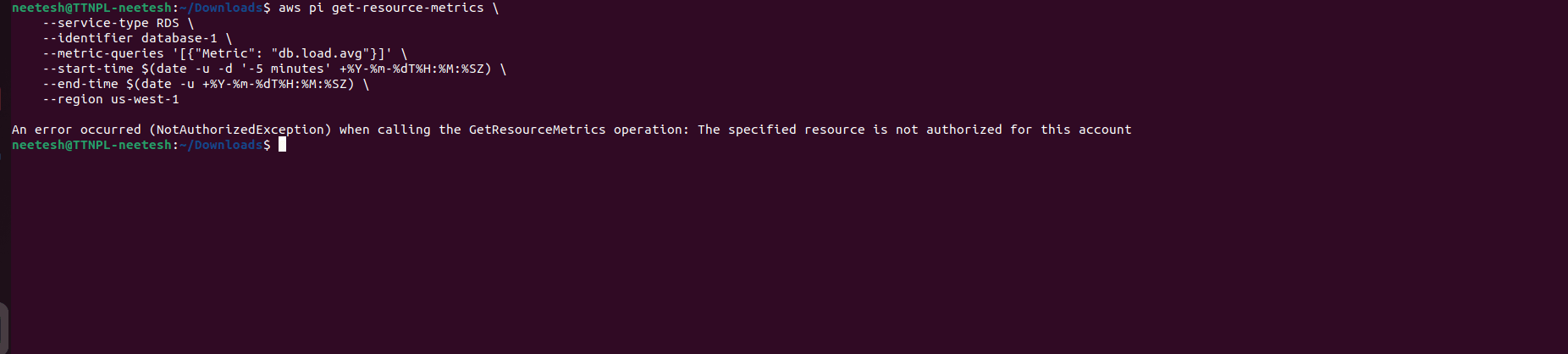
When executing the following AWS CLI command:
aws pi get-resource-metrics \
    --service-type RDS \
    --identifier database-1 \
    --metric-queries '[{"Metric": "db.load.avg"}]' \
    --start-time $(date -u -d '-5 minutes' +%Y-%m-%dT%H:%M:%SZ) \
    --end-time $(date -u +%Y-%m-%dT%H:%M:%SZ) \
    --region us-west-1
The following error occurs:
An error occurred (NotAuthorizedException) when calling the GetResourceMetrics operation: The specified resource is not authorized for this account
Solution:-
1. Ensure Performance Insights is Enabled
Run the following command to check if Performance Insights is enabled for your RDS instance:
aws rds describe-db-instances --db-instance-identifier database-1 --region us-west-1 --query 'DBInstances[0].PerformanceInsightsEnabled'
If the output is false, allow performance insights to for your RDS instance.

2. Check IAM Permissions
Even with AdministratorAccessEnsure your IAM role has the necessary permissions:
aws iam list-attached-user-policies --user-name YOUR_USER_NAME

3. Get the dbiResourceId
Retrieve the correct dbiResourceId:
aws rds describe-db-instances --db-instance-identifier database-1 --region us-west-1 --query 'DBInstances[0].DbiResourceId'
Use this dbiResourceId in the --identifier field of the get-resource-metrics command.

4. Get Resource Metrics using AWS CLI
Replace the identifier dbiResourceId, then run the command to get performance insights.
aws pi get-resource-metrics \
--service-type RDS \
--identifier DBI_RESOURCE_ID \
--metric-queries '[{"Metric": "db.load.avg"}]' \
--start-time $(date -u -d '2 hours ago' +%Y-%m-%dT%H:%M:%SZ) \
--end-time $(date -u +%Y-%m-%dT%H:%M:%SZ) \
--period-in-seconds 60 \
--region us-west-1

5. Check Performance Insights Data Availability Using Python Script
import boto3
from datetime import datetime, timedelta

def get_rds_performance_insights_metrics(db_instance_identifier, region_name, metric_name, period_seconds=60, minutes_ago=30):
    """
    Retrieves RDS Performance Insights metrics using the DbiResourceId.
    """
    try:
        rds_client = boto3.client('rds', region_name=region_name)
        pi_client = boto3.client('pi', region_name=region_name)

        response = rds_client.describe_db_instances(DBInstanceIdentifier=db_instance_identifier)
        dbi_resource_id = response['DBInstances'][0]['DbiResourceId']

        end_time = datetime.utcnow()
        start_time = end_time - timedelta(minutes=minutes_ago)

        response = pi_client.get_resource_metrics(
            ServiceType='RDS',
            Identifier=dbi_resource_id,
            MetricQueries=[{'Metric': metric_name}],
            StartTime=start_time,
            EndTime=end_time,
            PeriodInSeconds=period_seconds
        )

        return response

    except Exception as e:
        print(f"Error: {e}")
        return None

# Example usage
db_instance_id = 'database-1'
region = 'us-west-1'
metric = 'db.load.avg'

metrics_data = get_rds_performance_insights_metrics(db_instance_id, region, metric)

if metrics_data:
    print(metrics_data) #print the full response.
    for metric_list in metrics_data['MetricList']:
        print(f"Metric: {metric_list['Key']['Metric']}")
        #Correct the key to DataPoints.
        for data_point in metric_list['DataPoints']:
            timestamp = data_point['Timestamp']
            value = data_point.get('Value', None) #safely get value.
            print(f"  Timestamp: {timestamp}, Value: {value}")

Conclusion
Following these steps should help identify and resolve the issue with AWS Performance Insights API calls. If problems persist, check AWS CloudTrail logs for failed API calls or contact AWS Support.