
Cost Optimization with Planned Downtime Migrating an EBS-Backed StatefulSet from Multi-AZ to Single-AZ in Amazon EKS (Production Pattern)
This migration was performed on a production workload where cost reduction was prioritized over zone-level high availability.
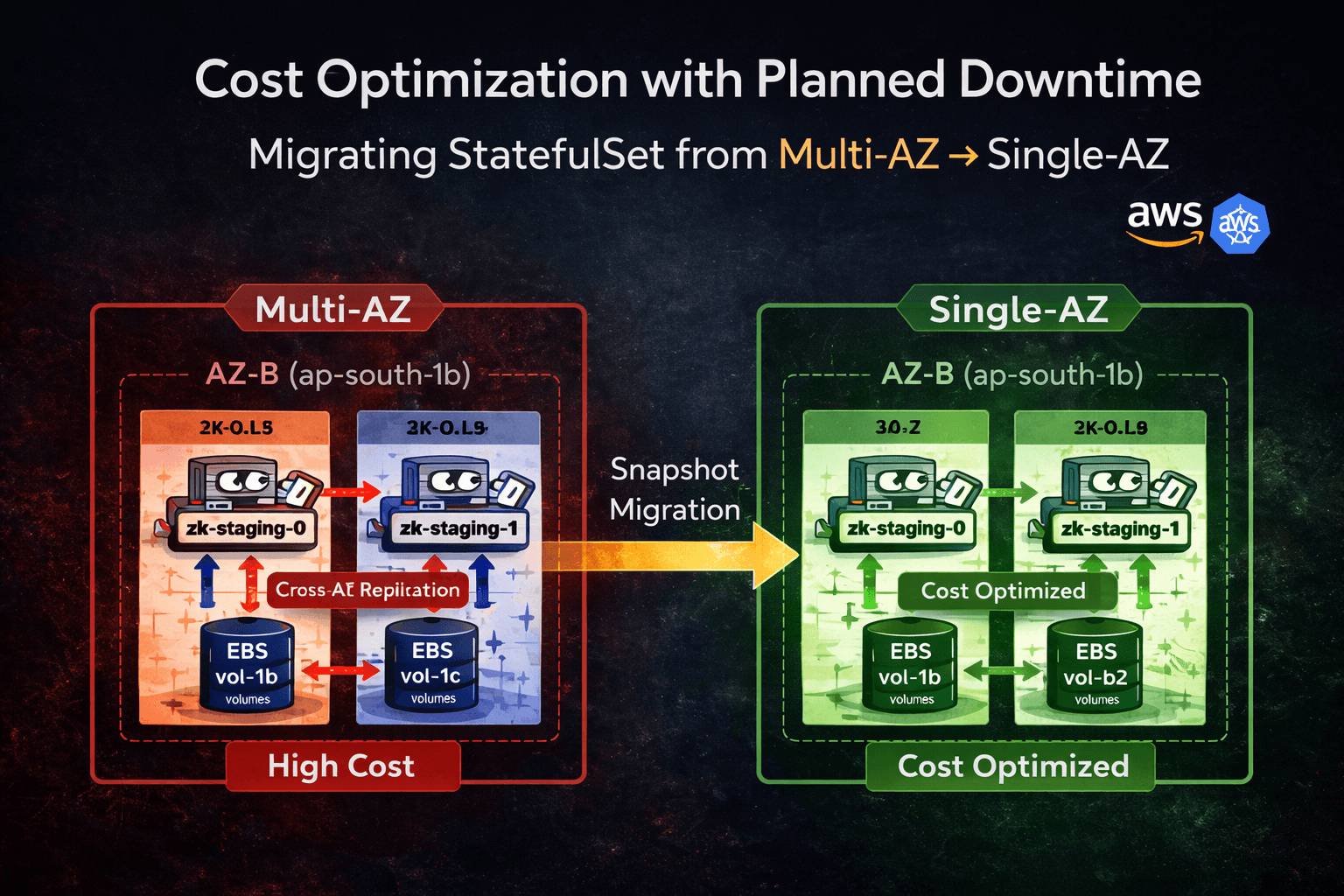
1. Overview
This article documents a real production-style migration of a Kubernetes StatefulSet backed by Amazon EBS from Multi-AZ to Single-AZ in Amazon EKS.
The migration was executed at the storage layer using EBS snapshots during a controlled maintenance window.
Objectives
Reduce cross-AZ replication and inter-AZ data transfer cost
Preserve existing EBS-backed data
Avoid provisioning a parallel Kafka cluster
Maintain deterministic storage recovery
Ensure logical RPO = 0 with verified clean shutdown and completed snapshot.
This was a cost-first architectural decision with acknowledged availability trade-offs.
2. Business Context
Kafka (with ZooKeeper) was deployed across:
ap-south-1bap-south-1c
Multi-AZ improved resilience, but introduced:
Continuous cross-AZ replication traffic
Inter-AZ data transfer billing
Increased recurring infrastructure cost
After analyzing recurring billing, cross-AZ traffic became a major cost driver.
Cost analysis showed that inter-AZ data transfer and cross-AZ replication traffic accounted for a significant percentage of the monthly Kafka infrastructure spend.
While Multi-AZ improved resilience, the business determined that the availability gain did not justify the recurring transfer cost for this workload profile.
Business decision:
Consolidate into single AZ
Downtime acceptable
No data loss allowed
3. Technical Constraint — Why This Is Not a Simple Scheduler Change
The workload runs as a StatefulSet using volumeClaimTemplates.
Storage backend: Amazon EBS via EBS CSI driver.
Important constraints:
EBS volumes are strictly AZ-scoped
PVs include
topology.kubernetes.io/zonenodeAffinityPVCs are tightly bound to PVs
EBS cannot attach across AZ
If we restrict nodeAffinity without moving storage:
Pod schedules successfully
Volume attach fails
Pod stuck in
ContainerCreating
This is fundamentally a storage locality constraint.
Storage must move before pods move.
4. Architecture Before Migration

Multi-AZ StatefulSet with cross-AZ replication traffic between replicas.
Characteristics
Replica-0 in
ap-south-1bReplica-1 in
ap-south-1cIndependent EBS volumes per replica
Continuous cross-AZ replication
Higher availability
Higher recurring cost
5. Migration Options Evaluated
Option 1 — Snapshot-Based Storage Migration (Chosen)
Flow:
Validate Kafka stability
Scale StatefulSet to 0
Snapshot EBS volumes
Restore volumes in the target AZ
Rebind PVCs via static PVs
Restrict scheduling
Safe staged bring-up
Properties:
Logical RPO = 0, assuming:
No under-replicated partitions
Clean shutdown
Snapshot completion verified
Planned downtime required
No duplicate cluster
Lowest infrastructure cost
Requires operational precision
Option 2 — Dual Cluster + MirrorMaker2
Flow:
Deploy new Kafka cluster in single AZ
Configure MirrorMaker2
Replicate topics
Validate offsets
Cut traffic
Decommission old cluster
Properties:
Near-zero downtime
Higher infrastructure cost
More operational complexity
Easier rollback
Because downtime was acceptable and cost reduction was urgent, Option 1 was selected.
6. Multi-AZ Deployment YAML (Reproducible Lab Setup)
# multi-az-zk.yaml
---
apiVersion: v1
kind: Namespace
metadata:
  name: tools
---
apiVersion: v1
kind: Service
metadata:
  name: zk-staging-headless
  namespace: tools
  labels:
    app: cp-zookeeper
    release: kafka-staging
spec:
  clusterIP: None
  selector:
    app: cp-zookeeper
    release: kafka-staging
  ports:
    - name: client
      port: 2181
      targetPort: 2181
---
apiVersion: apps/v1
kind: StatefulSet
metadata:
  name: zk-staging
  namespace: tools
spec:
  serviceName: zk-staging-headless
  replicas: 2
  selector:
    matchLabels:
      app: cp-zookeeper
      release: kafka-staging
  template:
    metadata:
      labels:
        app: cp-zookeeper
        release: kafka-staging
    spec:
      affinity:
        nodeAffinity:
          requiredDuringSchedulingIgnoredDuringExecution:
            nodeSelectorTerms:
              - matchExpressions:
                  - key: topology.kubernetes.io/zone
                    operator: In
                    values:
                      - ap-south-1b
                      - ap-south-1c
      containers:
        - name: cp-zookeeper
          image: docker.io/confluentinc/cp-zookeeper:5.5.6
          volumeMounts:
            - name: datadir
              mountPath: /var/lib/zookeeper/data
            - name: datalogdir
              mountPath: /var/lib/zookeeper/log
  volumeClaimTemplates:
    - metadata:
        name: datadir
      spec:
        accessModes:
          - ReadWriteOnce
        storageClassName: gp3
        resources:
          requests:
            storage: 10Gi
    - metadata:
        name: datalogdir
      spec:
        accessModes:
          - ReadWriteOnce
        storageClassName: gp3
        resources:
          requests:
            storage: 10Gi
Apply:
kubectl apply -f multi-az-zk.yaml
Validate zone distribution:
kubectl get nodes -L topology.kubernetes.io/zone
kubectl get pods -o wide -n tools
kubectl describe pv <pv-name>
7. Production Migration — Snapshot-Based Execution
Step 1 — Validate Kafka Stability
Before shutdown, ensure:
No under-replicated partitions
No leader elections are ongoing
ISR stable
Example:
kubectl logs <pod-name> -n tools
Step 2 — Protect Reclaim Policy
Before deleting PVCs:
kubectl get pv
Ensure persistentVolumeReclaimPolicy: Retain.
If not:
kubectl patch pv <pv-name> \
  -p '{"spec":{"persistentVolumeReclaimPolicy":"Retain"}}'
This prevents accidental EBS deletion.
Step 3 — Scale Down
kubectl scale statefulset zk-staging -n tools --replicas=0
kubectl get pods -n tools
Pre-Snapshot Validation — StatefulSet Ordinal Mapping (Critical)
Before taking snapshots, validate which EBS volume belongs to which StatefulSet ordinal.
StatefulSet PVC naming convention:
<claim-name>-<statefulset-name>-<ordinal>
Example:
datadir-zk-staging-0
datadir-zk-staging-1
Validate volume mapping:
kubectl get pvc -n tools
kubectl describe pvc datadir-zk-staging-1 -n tools
Extract:
Volume: pvc-xxxx
Then map to AWS volume:
aws ec2 describe-volumes \
  --filters Name=tag:KubernetesCluster,Values=<cluster-name>
Or inspect via:
kubectl describe pv <pv-name>
Confirm:
Correct ordinal
Correct AZ
Correct volume ID
If you restore the wrong ordinal volume to the wrong replica, data corruption or cluster quorum failure can occur.
Never assume volume ordering.
Validate explicitly.
Step 4 — Snapshot Volumes
aws ec2 create-snapshot \
  --volume-id vol-xxxx \
  --description "zk-migration"
Wait until the snapshot state = completed before proceeding.
Do not scale up or delete any additional resources until snapshot completion is verified via AWS CLI or console.
Step 5 — Restore With Matching Performance
Check original performance:
aws ec2 describe-volumes --volume-ids <volume-id>
Restore:
aws ec2 create-volume \
  --snapshot-id snap-xxxx \
  --availability-zone ap-south-1b \
  --volume-type gp3 \
  --iops 3000 \
  --throughput 125
Do not proceed until the restored volume state is "available" and fully initialized.
The restored volume must match the original volume type, IOPS, and throughput.
If performance parameters are reduced during restore:
Kafka disk flush latency may increase
Log segment recovery may slow
Consumer lag may spike
ZooKeeper session instability may occur
Storage migration must preserve performance characteristics, not just data.
Step 6 — Delete Replica PVCs
kubectl delete pvc datadir-zk-staging-1 -n tools
kubectl delete pvc datalogdir-zk-staging-1 -n tools
Because the reclaim policy is set to Retain, the underlying EBS volumes will not be deleted.
Step 7 — Static PV Restore YAML
# restore-pv.yaml
apiVersion: v1
kind: PersistentVolume
metadata:
  name: pv-restore-datadir-1
spec:
  capacity:
    storage: 10Gi
  accessModes:
    - ReadWriteOnce
  storageClassName: gp3
  persistentVolumeReclaimPolicy: Retain
  csi:
    driver: ebs.csi.aws.com
    volumeHandle: vol-RESTORED-DATADIR
    fsType: ext4
  nodeAffinity:
    required:
      nodeSelectorTerms:
        - matchExpressions:
            - key: topology.kubernetes.io/zone
              operator: In
              values:
                - ap-south-1b
---
apiVersion: v1
kind: PersistentVolume
metadata:
  name: pv-restore-datalogdir-1
spec:
  capacity:
    storage: 10Gi
  accessModes:
    - ReadWriteOnce
  storageClassName: gp3
  persistentVolumeReclaimPolicy: Retain
  csi:
    driver: ebs.csi.aws.com
    volumeHandle: vol-RESTORED-DATALOGDIR
    fsType: ext4
  nodeAffinity:
    required:
      nodeSelectorTerms:
        - matchExpressions:
            - key: topology.kubernetes.io/zone
              operator: In
              values:
                - ap-south-1b
Apply:
kubectl apply -f restore-pv.yaml
kubectl get pv
Step 8 — Restore PVC YAML
# restore-pvc.yaml
apiVersion: v1
kind: PersistentVolumeClaim
metadata:
  name: datadir-zk-staging-1
  namespace: tools
spec:
  accessModes:
    - ReadWriteOnce
  storageClassName: gp3
  resources:
    requests:
      storage: 10Gi
  volumeName: pv-restore-datadir-1
---
apiVersion: v1
kind: PersistentVolumeClaim
metadata:
  name: datalogdir-zk-staging-1
  namespace: tools
spec:
  accessModes:
    - ReadWriteOnce
  storageClassName: gp3
  resources:
    requests:
      storage: 10Gi
  volumeName: pv-restore-datalogdir-1
Apply and verify:
kubectl apply -f restore-pvc.yaml
kubectl get pv,pvc -n tools
Step 9 — Restrict Scheduling to Single AZ
Update nodeAffinity to:
ap-south-1b
Apply updated StatefulSet.
Step 10 — Safe Staged Bring-Up
kubectl scale statefulset zk-staging -n tools --replicas=1
Validate stability.
Then:
kubectl scale statefulset zk-staging -n tools --replicas=2
Migration complete.
8. Architecture After Migration

Inter-AZ data transfer cost is eliminated because both replicas now operate within ap-south-1b, but AZ-level redundancy is removed.
Capacity Validation Before Consolidation
Before consolidating both replicas into a single Availability Zone, validate:
Worker node CPU headroom
Available memory capacity
EBS volume attachment limits per node
Network bandwidth availability
Failure of ap-south-1b will now result in a full service outage until recovery.
Single-AZ consolidation increases resource contention risk and expands the blast radius.
Cost optimization must not introduce saturation instability.
Trade-Off
Single AZ failure = Full outage.
Availability ↓
Cost ↓
Intentional architectural decision.
Rollback Strategy
If issues occur:
Scale down
Restore original snapshots in their original Availability Zones.
Recreate original PV bindings
Revert nodeAffinity
Scale up gradually
Final Takeaway
This migration was not a scheduler tweak.
It was a storage topology redesign.
Stateful workloads are constrained by storage locality.
Storage must move before pods move.